

How to Fix Slow Empty Trash on MAC OSX
Is your MAC taking a very long time to finish when emptying your trash bin?

This is a common problem encountered when you have your secure empty trash option on. The feature enables user to securely erase the data from their MAC.
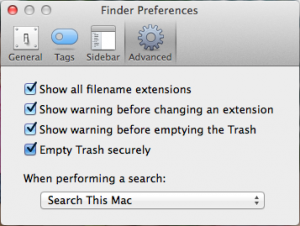
Here’s what you need to do to turn off the feature:
[postad] Step 1: Open Finder App
Step 2: From the Finder menu option, select Preferences.
Step 3: On Finder Preferences window, select advance tab and unselect option “Empty Trash securely” and close window.
Tip: Erase your data securely if you don’t want other people to restore any data which are already deleted or simply to protect your self from risk of having your data stolen. Even formatted hard drive can be restored. Do you know?
editor's pick
latest video
 For Lighthouse Baptist Church
news via inbox
Nulla turp dis cursus. Integer liberos euismod pretium faucibua
you might also like
http://www.google.com/finance/converter
select currency
http://www.google.com/finance/converter?&from=SGD&to=USD
http://www.google.com/finance/converter
select currency
http://www.google.com/finance/converter?&from=SGD&to=USD
http://www.google.com/finance/converter
select currency
http://www.google.com/finance/converter?&from=SGD&to=USD
