
How to Solve Error Chrome Version Must Be Between 70 and 73 on Selenium
Are you having this error when running ChromeDriver/Selenium Web Driver?
selenium.common.exceptions.SessionNotCreatedException: Message: session not created: Chrome version must be between 70 and 73

Here’s the step by step instruction on how to solve this error:
Step 1: Go to Chrome and check your Chrome version.

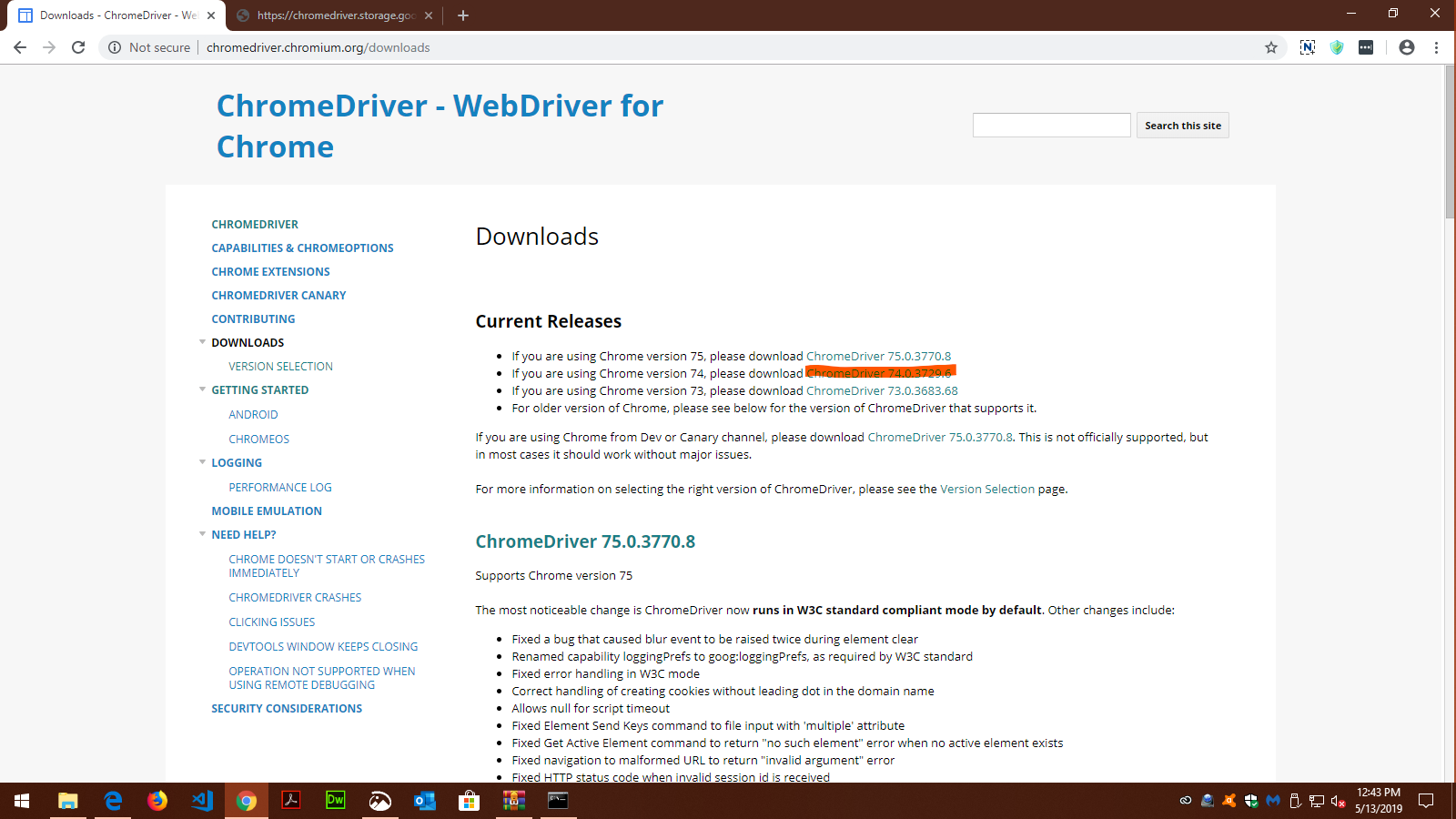
Step 2: Go to http://chromedriver.chromium.org/downloads and download the correct version of ChromeDriver, according to what Chrome version you currently have.
Step 3: Extract the ChromeDriver file and copy to your the Script folder inside your Python Path.
Step 4: Run your Python program again. That should solve the issue.

editor's pick
latest video
 For Lighthouse Baptist Church
news via inbox
Nulla turp dis cursus. Integer liberos euismod pretium faucibua
you might also like
http://www.google.com/finance/converter
select currency
http://www.google.com/finance/converter?&from=SGD&to=USD
http://www.google.com/finance/converter
select currency
http://www.google.com/finance/converter?&from=SGD&to=USD
http://www.google.com/finance/converter
select currency
http://www.google.com/finance/converter?&from=SGD&to=USD
