
How to Fix Slow Internet and Non-Loading Webpages in Safari and MAC OS X Yosimite
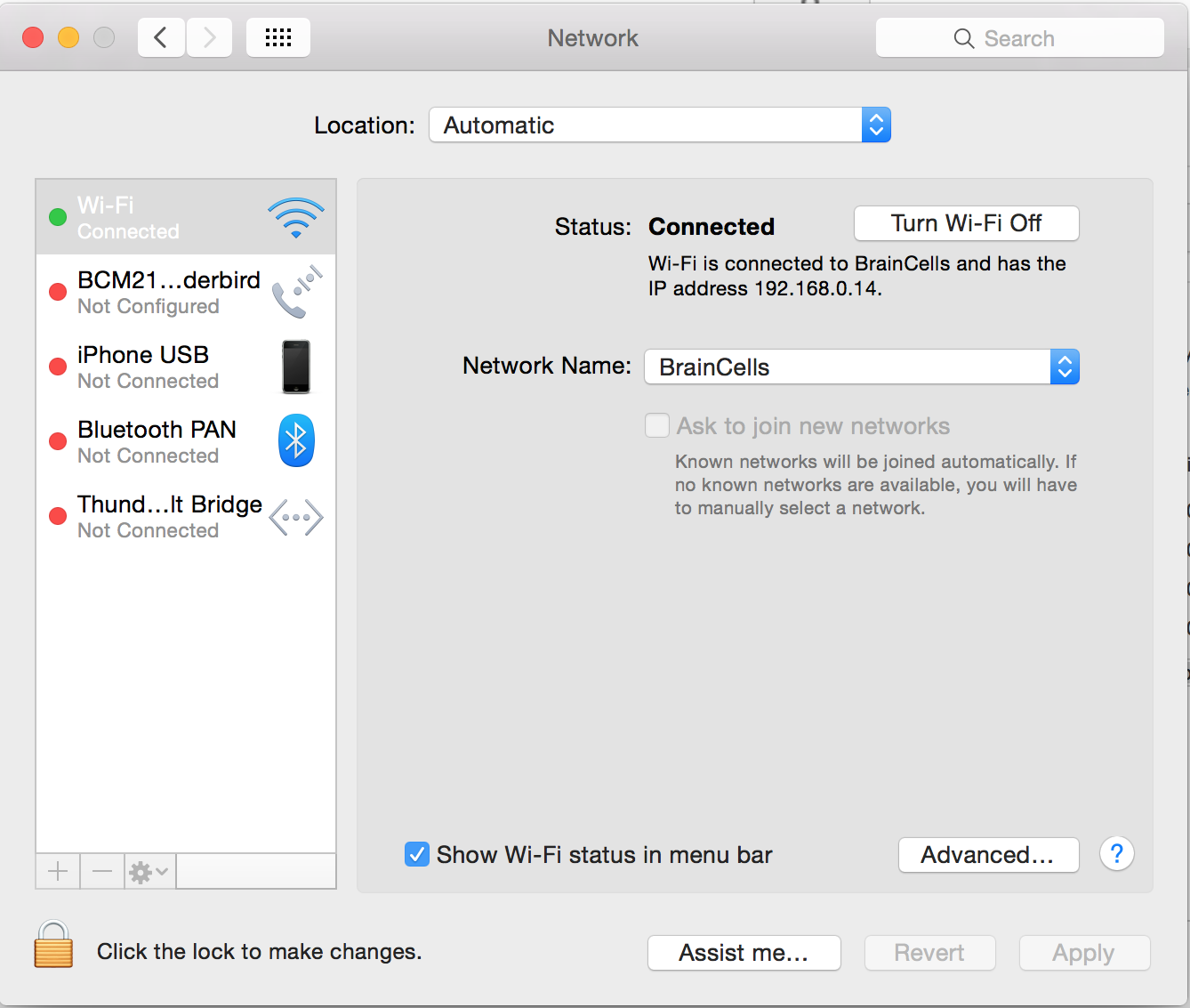
Upgrading to the new MAC OS X Yosimite has it’s toll. There’s still a lot of touching up to do to make this OS X better. One of the most common problem we encountered is the internet connectivity issues. Hope they come up with a fix for this but until then here’s a work around. Please follow these steps:
[postad]
- Go to System Preferences
- Select Network
- Click on Turn Wifi Off
- Then turn it back on by clicking Turn On Wifi
- Select appropriate Network Name
I know it seems like it’s not going to work, but it’s worth a try.
For video instructions, please watch video below:
[youtube http://youtu.be/p31-8UDUbQM]
editor's pick
latest video
 For Lighthouse Baptist Church
news via inbox
Nulla turp dis cursus. Integer liberos euismod pretium faucibua
you might also like
http://www.google.com/finance/converter
select currency
http://www.google.com/finance/converter?&from=SGD&to=USD
http://www.google.com/finance/converter
select currency
http://www.google.com/finance/converter?&from=SGD&to=USD
http://www.google.com/finance/converter
select currency
http://www.google.com/finance/converter?&from=SGD&to=USD
