

How to Connect to Network Location in MAC OS X
Unlike windows, MAC has a different way to connect to shared network files or network devices. To connect to your network follow this simple steps:
1. Click Finder
2. Click the Go menu
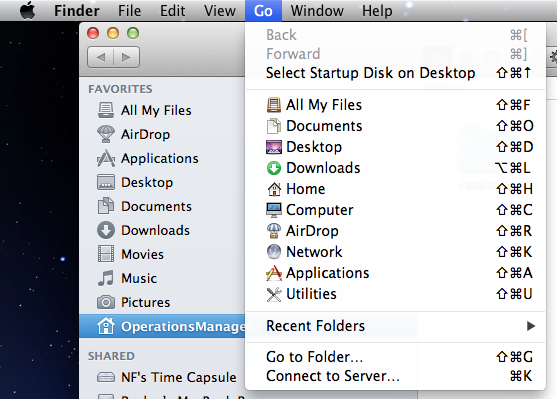
3. Click Connect to Server

Type smb://SERVERNAME/SHARENAME or use the Browse function to find the share you want.
4.Click Connect
editor's pick
latest video
 For Lighthouse Baptist Church
Created by: Paula Aduna
news via inbox
Nulla turp dis cursus. Integer liberos euismod pretium faucibua
you might also like
http://www.google.com/finance/converter
select currency
http://www.google.com/finance/converter?&from=SGD&to=USD
http://www.google.com/finance/converter
select currency
http://www.google.com/finance/converter?&from=SGD&to=USD
http://www.google.com/finance/converter
select currency
http://www.google.com/finance/converter?&from=SGD&to=USD
