

Capture Multiple Emails Using cPanel
Capture emails from multiple accounts at the same server. Here are the steps:
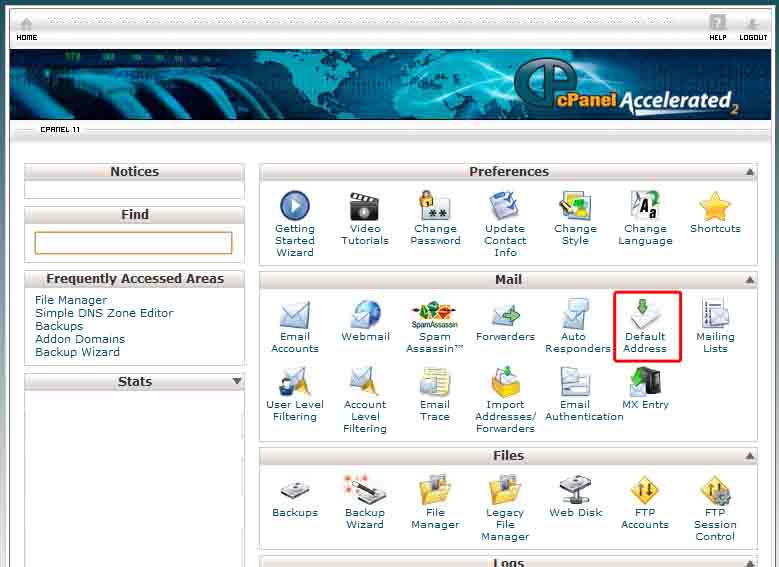
On your Cpanel, select Default Address.
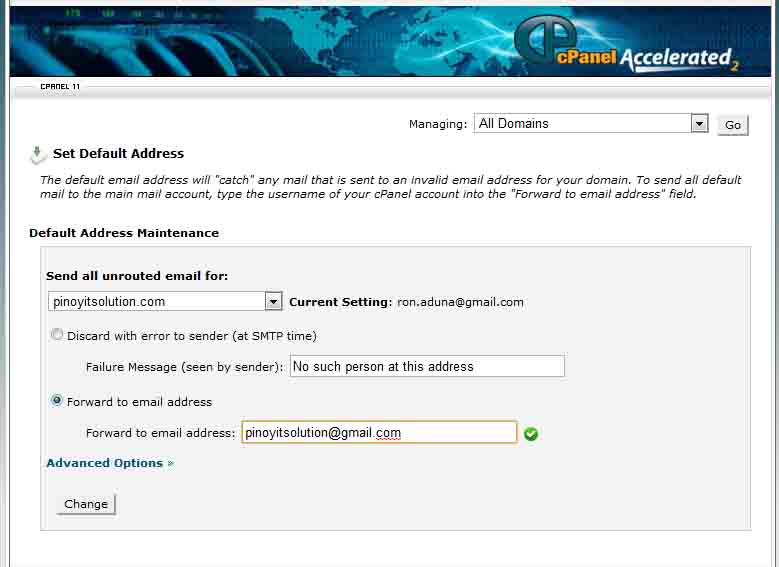
Select Forward to email address, and fill up your desired email address and done. You can now send to any account with the same domain. Example, you want to have a separate account for facebook, so you create [email protected], no need to create a separate account for it. All of your email will be captured to one account. These also works for those who have limited number of emails.
editor's pick
latest video
 For Lighthouse Baptist Church
Created by: Paula Aduna
news via inbox
Nulla turp dis cursus. Integer liberos euismod pretium faucibua
you might also like
http://www.google.com/finance/converter
select currency
http://www.google.com/finance/converter?&from=SGD&to=USD
http://www.google.com/finance/converter
select currency
http://www.google.com/finance/converter?&from=SGD&to=USD
http://www.google.com/finance/converter
select currency
http://www.google.com/finance/converter?&from=SGD&to=USD
