
How to Insert Google Ads in Your WordPress Post Using Shortcode
Aside from putting ads on sidebars, header and footer. Including ads inside your post will help on increasing revenue from Google Ads. This is the easiest way to have that ads on your post without installing any plugins.
Here are the steps on how to insert Google Ads in your WordPress post using shortcode
Step1: Go to Appearance – > Editor in your admin panel
[postad]
Step 2: Select your current Theme’s Functions.php
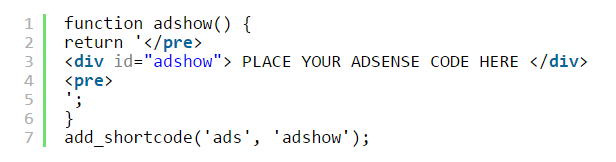
Step 3: Copy and paste this code to your functions.php
[code language=”html”] function adshow() {return ‘</pre>
<div id="adshow"> PLACE YOUR ADSENSE CODE HERE </div>
<pre>
‘;
}
add_shortcode(‘ads’, ‘adshow’);[/code]
Step 4: replace the text “PLACE YOUR ADSENSE CODE” with your actual Adsense code and save.
Step 5: Use [ads] shortcode for placing ads to your post. Enjoy!
editor's pick
latest video
 For Lighthouse Baptist Church
news via inbox
Nulla turp dis cursus. Integer liberos euismod pretium faucibua
you might also like
http://www.google.com/finance/converter
select currency
http://www.google.com/finance/converter?&from=SGD&to=USD
http://www.google.com/finance/converter
select currency
http://www.google.com/finance/converter?&from=SGD&to=USD
http://www.google.com/finance/converter
select currency
http://www.google.com/finance/converter?&from=SGD&to=USD
