

Turn Administrator Account On/Off on Windows 10
Turning administrator account on/off may come handy when doing computer maintenance or update. Here’s how you do it.
Steps on how to turn On Administrator account on Windows 10:
Step 1: On your keyboard press Windows+R to show the run dialog box.
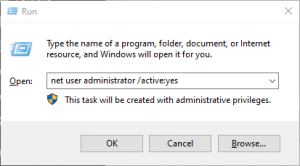
Step 2: type “net user administrator /active:yes” on the text box then press Enter.
Steps on how to turn On Administrator account on Windows 10:
Step 1: On your keyboard press Windows+R to show the run dialog box.
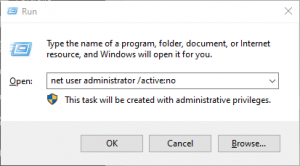
Step 2: type “net user administrator /active:no” on the text box then press Enter.
editor's pick
latest video
 For Lighthouse Baptist Church
news via inbox
Nulla turp dis cursus. Integer liberos euismod pretium faucibua
you might also like
http://www.google.com/finance/converter
select currency
http://www.google.com/finance/converter?&from=SGD&to=USD
http://www.google.com/finance/converter
select currency
http://www.google.com/finance/converter?&from=SGD&to=USD
http://www.google.com/finance/converter
select currency
http://www.google.com/finance/converter?&from=SGD&to=USD
