
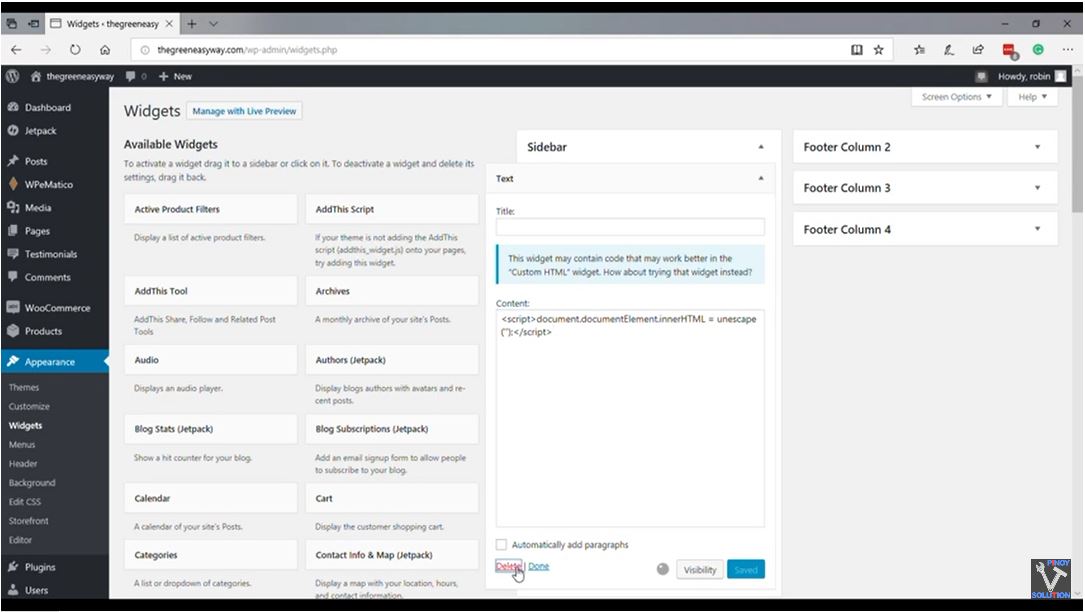
Fix WordPress/Woocommerce Blank Page Error
Steps on how to fix WordPress / Woocommerce displays a blank page on shop and pages:
Step 1: Go to Admin Dashboard.
Step 2: Go to Widget
Step 3: Delete malicious widget.
The blank page is caused by a malicious code on the widget. Getting rid of it will restore pages affected.
Hope it solved your issue. Please take the time to subscribe to our Youtube channel, your subscription motivates us to do more videos.
Watch the full video tutorial below:
editor's pick
latest video
 For Lighthouse Baptist Church
news via inbox
Nulla turp dis cursus. Integer liberos euismod pretium faucibua
you might also like
http://www.google.com/finance/converter
select currency
http://www.google.com/finance/converter?&from=SGD&to=USD
http://www.google.com/finance/converter
select currency
http://www.google.com/finance/converter?&from=SGD&to=USD
http://www.google.com/finance/converter
select currency
http://www.google.com/finance/converter?&from=SGD&to=USD
