
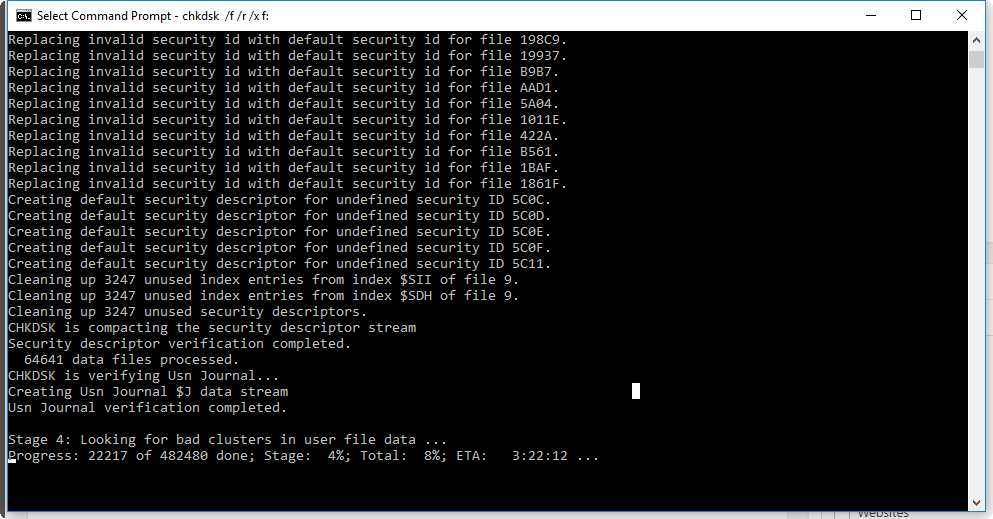
Fix HDD – Invalid Parameter on Windows 10
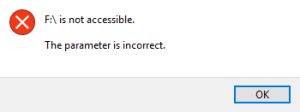
Step 1: Press Windows+R.
Step 2: Type CMD then Enter.
Step 3: in the command line, type “chkdsk /f /r /x f:” then press enter.
note: (replace the “f:” with the drive letter of the drive with error.)
Step 4: Wait until check disk utility finish the process.
editor's pick
latest video
 For Lighthouse Baptist Church
Created by: Paula Aduna
news via inbox
Nulla turp dis cursus. Integer liberos euismod pretium faucibua
you might also like
http://www.google.com/finance/converter
select currency
http://www.google.com/finance/converter?&from=SGD&to=USD
http://www.google.com/finance/converter
select currency
http://www.google.com/finance/converter?&from=SGD&to=USD
http://www.google.com/finance/converter
select currency
http://www.google.com/finance/converter?&from=SGD&to=USD
