
How To Create A Donate Button Using Paypal
Donate button are commonly used by bloggers to seek support from readers. You can choose from Paypal or Google Checkout. Since Google Checkout is only limited to few countries, we will use Paypal. Paypal currently offers creating a buy/pay, add to cart and subscribe button. Now, where do you get the donate button? Simple, we customize the buy/pay button. Here are the steps on how to do a donated button in Paypal.
- Login to your Paypal Account. Go to Merchant Services/Tools. Under “Payment buttons:
- Under Payment Buttons, Select click on “create one now” below buy now photo.
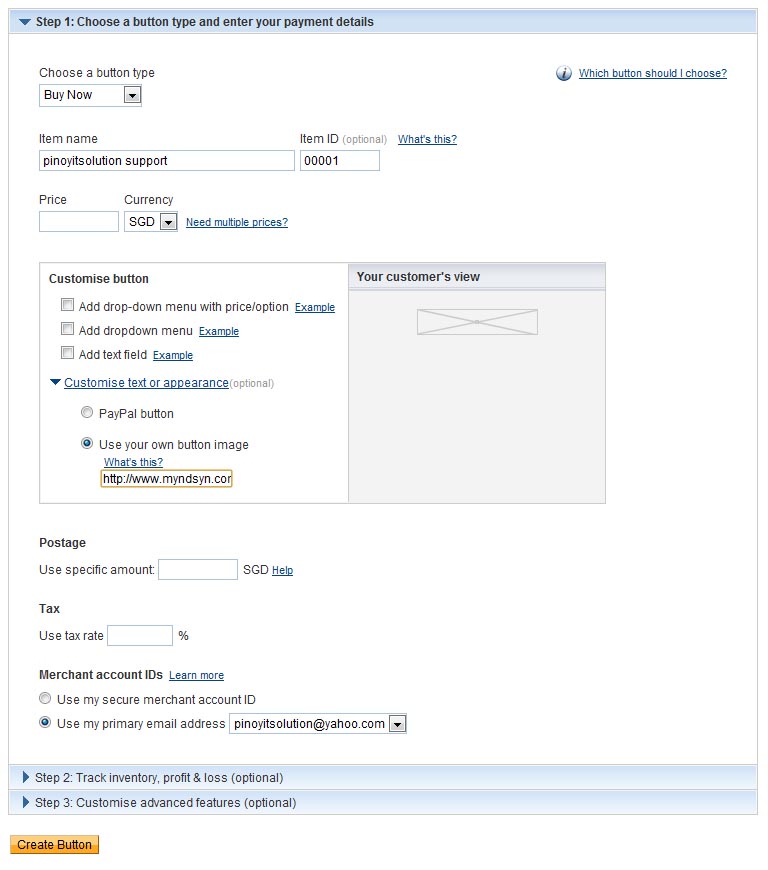
- Complete the create Paypal payment button form. Refer below for sample.
- Remember to keep the price blank so that the donator can put what ever amount he want to give.
- and lastly use this URL for the image https://www.pinoyitsolution.com/pinoyitsolution/images/btn_donate.gif
- Select email address to display on checkout page and press create button.
- Paypal will now generate a code for you. Copy it to your blog or website and you’re done.
 |
| Sample form |
 |
| Sample Donate Button |

editor's pick
latest video
 For Lighthouse Baptist Church
news via inbox
Nulla turp dis cursus. Integer liberos euismod pretium faucibua
you might also like
http://www.google.com/finance/converter
select currency
http://www.google.com/finance/converter?&from=SGD&to=USD
http://www.google.com/finance/converter
select currency
http://www.google.com/finance/converter?&from=SGD&to=USD
http://www.google.com/finance/converter
select currency
http://www.google.com/finance/converter?&from=SGD&to=USD

