
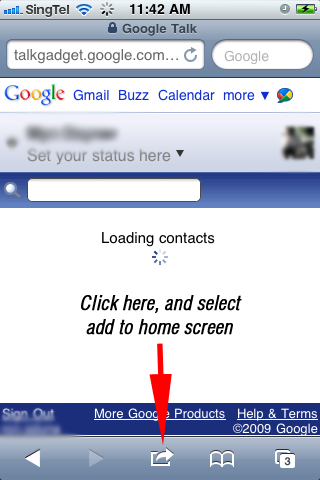
Adding GoogleTalk To Your Iphone
Google Talk is not available in Iphone App Store, you must add it manually in able to use it in your Iphone. Please follow the this steps:
- In your Iphone, go to your Safari browser.
- Go to this URL talkgadget.google.com.
- Add Google Talk to your home screen by clicking the center button below your browser and selecting add to home screen.
- After that they will ask you for the name which you want to call your site. You can rename it if you like and after that proceed.
- You can now access your Google Talk on your home screen.
Tips: With your Google Talk in your home screen, you can now directly access the website without opening your safari browser. Now it acts as a native App in your Iphone.
See below for the screen captures.


editor's pick
latest video
 For Lighthouse Baptist Church
news via inbox
Nulla turp dis cursus. Integer liberos euismod pretium faucibua
you might also like
http://www.google.com/finance/converter
select currency
http://www.google.com/finance/converter?&from=SGD&to=USD
http://www.google.com/finance/converter
select currency
http://www.google.com/finance/converter?&from=SGD&to=USD
http://www.google.com/finance/converter
select currency
http://www.google.com/finance/converter?&from=SGD&to=USD
