
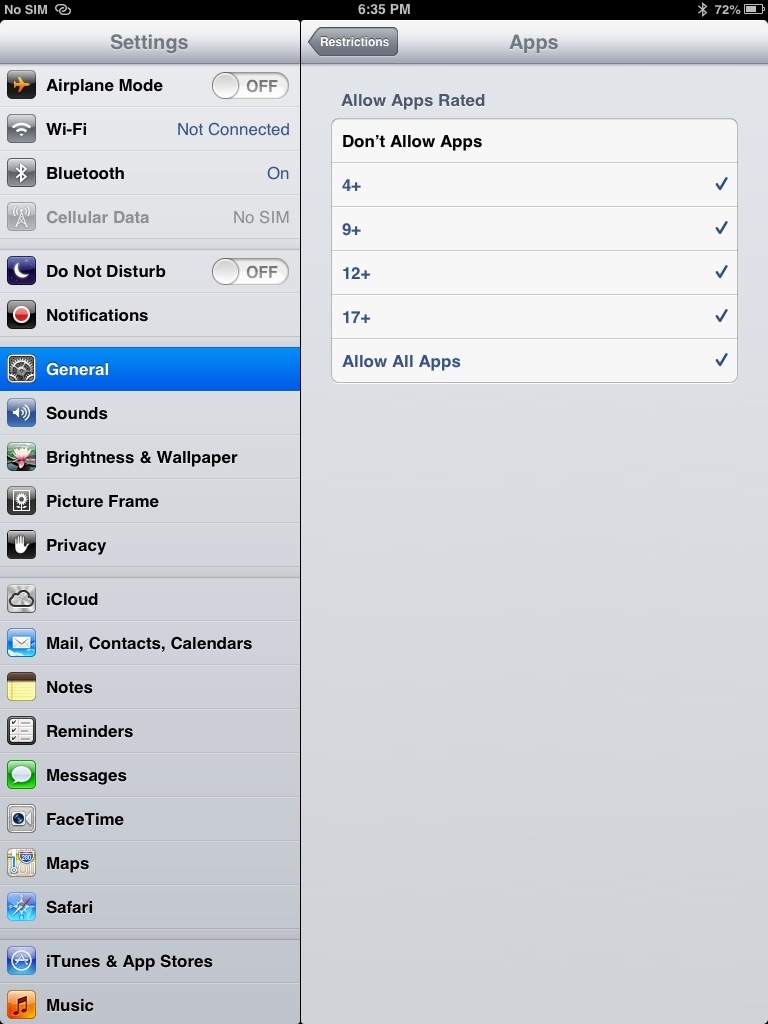
How to Reset Apps View on iPad / iPhone / iPod
Step 1. Go to Settings / General / Restrictions
Step 2. Enter Restriction Pass Code if restrictions option is On, if not select Enable and set Retriction Pass Code.
Step 3. Under allowed content select Apps, then click on Don’t Allow Apps. Press Home button.
Step 4. Repeat entire steps but this time around click Allow All Apps.
Notice that upon completion of step 3 default built in Apps will be displayed, but installing additional Apps won’t be allowed. Once all steps are done, default Apps will be displayed on 1st page and all your installed apps will be displayed on second page onwards in alphabetical order.
editor's pick
latest video
 For Lighthouse Baptist Church
news via inbox
Nulla turp dis cursus. Integer liberos euismod pretium faucibua
you might also like
http://www.google.com/finance/converter
select currency
http://www.google.com/finance/converter?&from=SGD&to=USD
http://www.google.com/finance/converter
select currency
http://www.google.com/finance/converter?&from=SGD&to=USD
http://www.google.com/finance/converter
select currency
http://www.google.com/finance/converter?&from=SGD&to=USD
